Service-to-service Auth
This section describes how the Game Provider validates and processes requests sent by the Licensee based on the provided information.
Technical Specifications
The Game Provider provides HTTP API services according to the following specifications:
- Requests follow a RESTful style
- Only HTTPS endpoints are supported
- Requests and responses use JSON format with the
content-type: application/jsonheader - Specific headers are required in the HTTP Header, and header names are case-insensitive
- Authentication methods (choose one):
- Add
authorization: ECDSA-SHA256 <Signature>in Request Header. 1 - Add
authorization: HMAC-SHA256 <Signature>in Request Header. 1 - Add
authorization: Basic <base64(client_id:client_secret)>in Request Header. - Add
api-key: <API_KEY>in Request Header. 2 - Add
api_key=<API_KEY>in the Query String (Strongly discouraged)
- Add
API_KEYandCLIENT_SECRET- Provided by the Game Provider
CLIENT_SECRETmust consist of valid Base64 characters 3API_KEYshould be a randomly generated Hex string of 22 to 36 characters
- API endpoint requirements
- The domain must have a valid HTTPS certificate
- Must use a fixed public IP or a stable DNS record
- Temporary tunneling services or short URLs are NOT ALLOWED
HTTP Header
The following three headers are required:
| Header | Description | Example |
|---|---|---|
yac-client-id |
Identifier of the request source, assigned by the Game Provider to the Licensee | yac-client-id: asia-platform-1 |
yac-timestamp |
Request creation time (Unix timestamp in seconds), used to verify expiration | yac-timestamp: 1772532662 |
yac-nonce |
A one-time random value used to prevent replay attacks | yac-nonce: 8f3c9a1e7b |
If signature-based authentication is used, the PATHNAME 4 must also be included in the signature scope.
Depending on the authentication method you use, the following two headers must also be included:
| Header | Description | Example |
|---|---|---|
authorization |
Used to transmit signature or credential information. Depending on the authentication method, it may include an ECDSA or HMAC signature, or carry an API key. | authorization: <scheme> <signature> |
api-key |
Used to pass the API key via a custom header. This method only provides client identification and does not involve request signing. When using this mode, the server authorizes requests based on the configuration mapped to the API_KEY. |
api-key: AbCdEf123456 |
HTTP Request Credential Example
-
Generate an asymmetric key pair.
openssl genpkey -algorithm EC -pkeyopt ec_paramgen_curve:P-256 -out private.pem
openssl pkey -in private.pem -pubout -out public.pem
Example Output:
-----BEGIN PUBLIC KEY----- MFkwEwYHKoZIzj0CAQYIKoZIzj0DAQcDQgAEQqszVcNCJG5KSg8auk/cvMbc/Dmt Y9Gw9/qNLmCOB2yQumh+YZ5k/feQLKb0fsDDXvmZbtux01tYoKkwz4SBVA== -----END PUBLIC KEY----- -----BEGIN PRIVATE KEY----- MIGHAgEAMBMGByqGSM49AgEGCCqGSM49AwEHBG0wawIBAQQgsHVgQ8L08worK8re VqktCM3g0xqwonILOS71PM+30y6hRANCAARCqzNVw0IkbkpKDxq6T9y8xtz8Oa1j 0bD3+o0uYI4HbJC6aH5hnmT995AspvR+wMNe+Zlu27HTW1igqTDPhIFU -----END PRIVATE KEY----- -
Before sending a request, the Licensee must first construct the signature string in the following order:
{yac-client-id};{yac-timestamp};{yac-nonce};<PATH_NAME>If the API URL is
https://endporint.example.com/api/example, the signature string should be:asia-platform-1;1772532662;8f3c9a1e7b;/api/example -
Generate the signature.
printf "asia-platform-1;1772532662;8f3c9a1e7b;/api/example" \
| openssl dgst -sha256 -sign private.example.pem | base64 -w 0

# If base64 does not have the -w parameter, please remove the newline character.
printf "asia-platform-1;1772532662;8f3c9a1e7b;/api/example" \
| openssl dgst -sha256 -sign private.example.pem | base64 | tr -d '\n'
Example Output:
MEUCIAxFDTqxDSQqkhWVoBPVPkLpZ2legE+jdSrmc56GXdc6AiEA+XOgxPad1YFScBdP6VoSAr01zzdGzPGKR017MAfjNUk= -
Build HTTP Request
curl -X POST "https://endpoint.example.com/api/example" \
    -H "content-type: application/json" \
    -H "yac-client-id: asia-platform-1" \
    -H "yac-timestamp: 1772532662" \
    -H "yac-nonce: 8f3c9a1e7b" \
    -H "authorization: ECDSA-SHA256 MEUCIAxFDTqxDSQqkhWVoBPVPkLpZ2legE+jdSrmc56GXdc6AiEA+XOgxPad1YFScBdP6VoSAr01zzdGzPGKR017MAfjNUk=" \
    -d '{"payload": {}}'
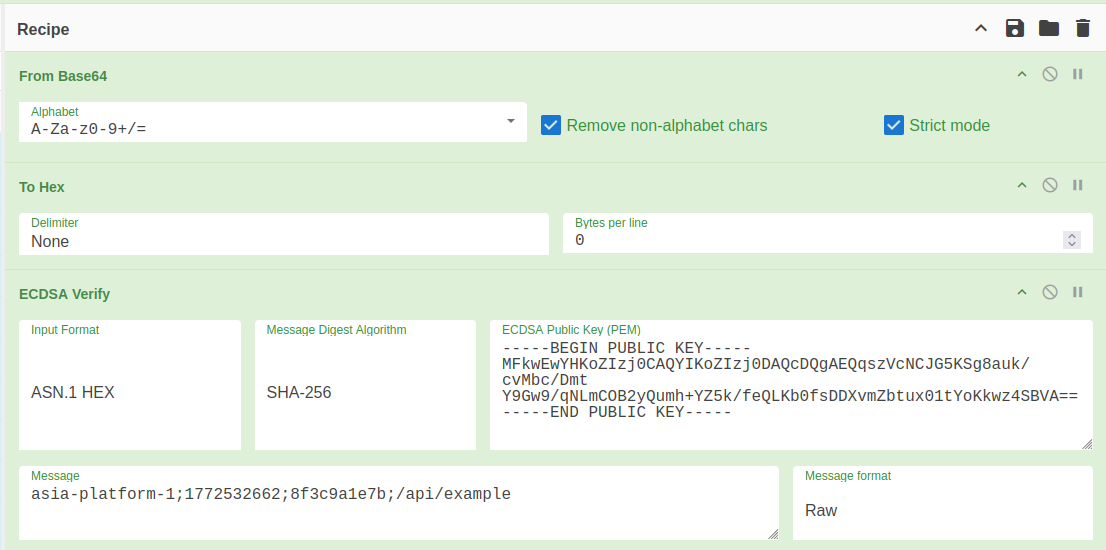
CyberChef: Verify Recipe
-
Provider
CLIENT_SECRETby Game Provider :openssl rand -base64 32Example Output:
FUg7pODYd+z48OlcaMlTddUQDaH8CABxoOC7Q5EIxGM= -
Before sending a request, the Licensee must first construct the signature string in the following order:
{yac-client-id};{yac-timestamp};{yac-nonce};<PATH_NAME>If the API URL is
https://endporint.example.com/api/example, the signature string should be:asia-platform-1;1772532662;8f3c9a1e7b;/api/example -
Generate the signature.
printf "asia-platform-1;1772532662;8f3c9a1e7b;/api/example" \
| openssl dgst -sha256 -hmac "FUg7pODYd+z48OlcaMlTddUQDaH8CABxoOC7Q5EIxGM=" -binary | base64 -w 0

# If base64 does not have the -w parameter, please remove the newline character.
printf "asia-platform-1;1772532662;8f3c9a1e7b;/api/example" \
| openssl dgst -sha256 -hmac "FUg7pODYd+z48OlcaMlTddUQDaH8CABxoOC7Q5EIxGM=" -binary | base64 | tr -d '\n'
Example Output:
kSVTmTq9QvJHa786VCkzjBmMpQ4WFk7qTupR8SBPOKo= -
Build HTTP Request
curl -X POST "https://endporint.example.com/api/example" \
    -H "content-type: application/json" \
    -H "yac-client-id: asia-platform-1" \
    -H "yac-timestamp: 1772532662" \
    -H "yac-nonce: 8f3c9a1e7b" \
    -H "authorization: HMAC-SHA256 kSVTmTq9QvJHa786VCkzjBmMpQ4WFk7qTupR8SBPOKo=" \
    -d '{}'
-
Provider
CLIENT_SECRETBy Game Provider :# randomly generated Hex string of 22 to 36 characters openssl rand -hex $string_lengthExample Output:
bf6bcfba6cd20a2f0ba80208c3de9e1604358ba813b48cdfe7fd -
Before sending a request, the Licensee must first construct the base64-string in the following order:
<CLIENT_ID>:<CLIENT_SECRET>Encode using base64
printf "asia-platform-1:bf6bcfba6cd20a2f0ba80208c3de9e1604358ba813b48cdfe7fd" | base64 -w 0Example Output:
YXNpYS1wbGF0Zm9ybS0xOmJmNmJjZmJhNmNkMjBhMmYwYmE4MDIwOGMzZGU5ZTE2MDQzNThiYTgxM2I0OGNkZmU3ZmQ=Put content into
authorization: Basic <base64(client_id:client_secret)>replace<base64(client_id:client_secret)> -
Build HTTP Request
curl -X POST "https://endporint.example.com/api/example" \
    -H "content-type: application/json" \
    -H "yac-client-id: asia-platform-1" \
    -H "yac-timestamp: 1772532662" \
    -H "yac-nonce: 8f3c9a1e7b" \
    -H "authorization: Basic YXNpYS1wbGF0Zm9ybS0xOmJmNmJjZmJhNmNkMjBhMmYwYmE4MDIwOGMzZGU5ZTE2MDQzNThiYTgxM2I0OGNkZmU3ZmQ=" \
    -d '{}'
-
Provider
API_KEYby Game Provider:# randomly generated Hex string of 22 to 36 characters openssl rand -hex $string_lengthExample Output:
590746ceb2a7b943ab123bdcc0105c3e296ef1d12b6a -
Put
590746ceb2a7b943ab123bdcc0105c3e296ef1d12b6ainto HTTP Header or Query Stringapi-key: 590746ceb2a7b943ab123bdcc0105c3e296ef1d12b6a?api_key=590746ceb2a7b943ab123bdcc0105c3e296ef1d12b6a
-
Build HTTP Request
curl -X POST "https://endporint.example.com/api/example" \
    -H "content-type: application/json" \
    -H "yac-client-id: asia-platform-1" \
    -H "yac-timestamp: 1772532662" \
    -H "yac-nonce: 8f3c9a1e7b" \
    -H "api-key: 590746ceb2a7b943ab123bdcc0105c3e296ef1d12b6a" \
    -d '{}'
Important
If
API_KEYappears in both the HTTP Header and the Query String, the server will only use the value in the Header for validation and will ignore theapi_keyin the Query String.Additionally, using
API_KEYas the primary authentication method is not recommended. This approach is typically used for testing environments or compatibility purposes. If the integration supports signature-based mechanisms, it is recommended to prioritizeHMAC-SHA256orECDSA-SHA256for authentication.
Unless the integrating party’s hardware or software environment is outdated and unable to implement signature mechanisms,API_KEYshould not be used as the primary authentication method in production environments.
Please ensure that the Licensee and Game Provider confirm the authentication method to be used in their collaboration, and complete the exchange of CLIENT_SECRET or PUBLIC_KEY before integration.
Request Initiator
This section only describes the authentication model that the Licensee must follow when making requests to the Game Provider.
If, during integration, the Licensee requires the Game Provider to initiate requests to its endpoints, additional documentation must be provided for proper integration.
Please refer to Licensee Should Implement。